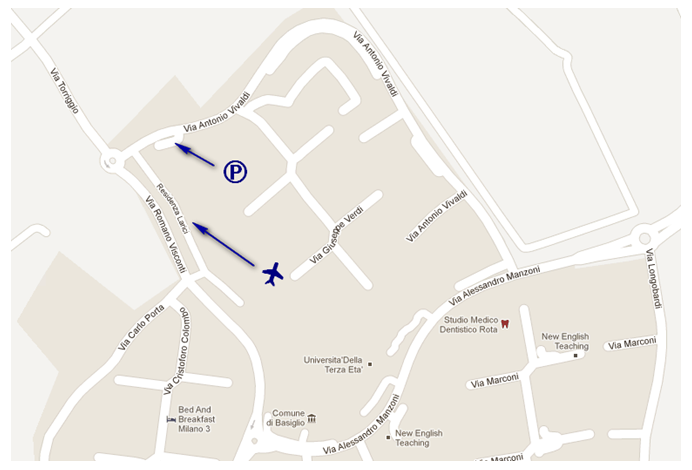
Se cercate una simulazione più realistica nelle vicinanze di Milano potete rivolgervi al Centro AZ di Basiglio (MI) dove protrete volare a prezzi accessibili su un simulatore professionale con o senza assistenza! Scegliere se volare da soli o in due sta a voi come la scelta dell' aeroporto, delle condizioni meteo e dell' aereo; di certo la grafica spettacolare e la strumentazione per i voli IFR non vi deluderanno! Che dire buon divertimento ;)
Vi allego qui sotto le immagini del volantino!
Per informazioni telefonate al 3479288206 o mandate una mail all' indirizzo Angelostucchi@Fastwebnet.it
Ecco due video di atterraggi in due tra gli aeroporti più pericolosi del mondo; siamo nelle antille, a bordo di due DHC-6 della Winair, si decolla dall' aeroporto internazionale di St. Maarten per atterrare prima a Saba e poi a St. Barth, non perdetevi due avvicinamenti spettacolari!
Oggi vi presento un accorgimento per ottenere più FPS e allo stesso tempo diminuire o eliminare completamente le Blurries, quelle fastidiose sfocature del terreno in lontanza!
Per ottenere tutto ciò dovremo scaricare dei file.rar che vadano a sostituire le textures di default di Fsx con delle textures convertite e meno pesanti!
Guardiamo il video qui sotto, che illustra i miglioramenti che si possono ottenere!
-QUANTI FPS IN PIU' SI POSSONO OTTENETE? Secondo questo video si possono ottenere eccellenti miglioramenti anche in termini di FPS oltre a diminuire le sfocature del terreno. Nel video sono passati da 9Fps 33Fps, io avendo installato le textures convertite ho notato un leggero miglioramente, circa 10Fps in più! Niente male secondo me! -COME SI INSTALLANO LE TEXTURES? Per prima cosa bisogna scaricare i 4 file RAR per un totale di 687Mb. Una volta scaricati cliccate sul file.rar chiamato FSXconversionPart1 (per aprire un qualunque file Rar avete bisogno di un programma, esempio WINRAR), una volta che vorrete estrarre il file autoinstallante delle textures dal file.rar dovrete inserire una password che è WhiskeyMike . Giunti a questo punto estraete il file autoinstallante delle textures in qualunque cartella e una volta finito di estrarre eseguite il file chiamato FsxTexturesConversion.exe , si aprirà una finestra dove potrete visualizzare il processo d' installazione delle nuove textures! Per chi avesse REX o FEX installato, il produttore sconsiglia l' installazione di queste textures.-DOWNLOAD (687Mb)
Oggi vi presento un video dedicato a tutti i flight simmers amanti degli Airbus! Un piccolo assaggio di una nuova creazione Black Box, si tratta dell' Airbus X il quale dovrebbe uscire nei prossimi giorni!
Ecco qui cosa offre questo prodotto! A mio avviso dovrebbe essere il migliore Airbus mai sviluppato per Fsx, con grafica migliore dell' Airbus by Wilco e dell' Airbus X by Aerosoft!
The AIRBUS X'TREME "Prologue" will contain a complex and faithful rendition of the
A319 and A320 2D Panel. Amongst the advanced features included are:-
• Custom Fly By Wire System
• Custom Autopilot and Auto Thrust systems
• Switchable Multifunction CRT display screens, PFD, ND, ECAM1 & ECAM2
• Programmable MCDU and FCU with Managed CLB and DECENT + Constraints
• Uses Navigraph Navdata with Sids & Stars
• Flightplans can use constraints, step climb, holds and Alternate destinations
• Autopilot with Managed, VSI, FPA, Heading, Track and Nav modes
• Autothrust with easy to use Preset detents for Managed and Spd modes
• Full Cat I, II AND III Auto land features
• FBW Envelope protection, anti stall, pitch, roll and g-load limiting
• One click Popups on all MFD's
• IFR and VFR Panels for CAPT & FO in both normal and widescreen
• Fully featured pedestal
• Overhead panel
• Separate Integral and flood lighting
• Accurate font used on MFD's FCU, MCDU and ECAMS
• Sub pixel GDI rendering for ultra smooth operation and excellent frame rates
• Fully featured Engine FADEC with individual assignable throttle axis
• Advanced 3dsMax modelling
• CFM & IAE V2500 Engines
• Exterior model contains in excess of 150 thousand polygons
• Over 50 Custom animations
• Custom "smooth running" Engine Fan animations + 3d Fan Blades
• Ram Air Turbine
• Pressurisation Vents
• Pop out Landing lights
• Full 3d cockpit visible through windows
• Highly detailed landing gear and gear bays
• Front and rear Pax doors + cargo doors
• 3d Windows with reflective + specular refractive glass
• Reverse thrust system
• 3d animated and sequenced Flaps/Slats/Speedbrakes
• + a few easter eggs for the adventurous !
• Virtual Cockpit contains in excess of 160 thousand polygons
• Every feature of the 2D Panel is reflected in the VC
• Animated Pull out tables, Sunblinds, Jumpseat & Armrests ++
• All knobs dials and switches faithfully reproduced in animated 3d
• Captain, First Officer and Jumpseat positions available
• Rear overhead section with Breakers and reading Lights
• Separate flood and integral lighting + test switches for warnings
• Fully textured & Bump mapped parts include seat fabric and carpets
• 3d modelled Standby Gauges
• Reflective glass in all gauges and windows (reflects cockpit environment)
• Highly detailed Side sticks, Non animated under autopilot control
• Highly detailed Thrust levers with "Automatic" Keyboard detents + Manual
• + A few surprises for the curious
• Accurate flight dynamics, tested by 3 active Airbus pilots
• High Definition 4096x4096 texture and bump mapping
• Custom designed Accurate Fonts used in gauges and exterior
• HI-FI Sound sets for CFM & IAE versions
• Additional custom cockpit and system sounds
• + much more !

 Metti MI PIACE alla nostra pagina Facebook se ti piace questo blog!
 Blog dedicato al volo reale e alla simulazione di volo
 Blog Blog dedicato al volo reale e alla simulazione di volo
 Benvenuti-Welcome
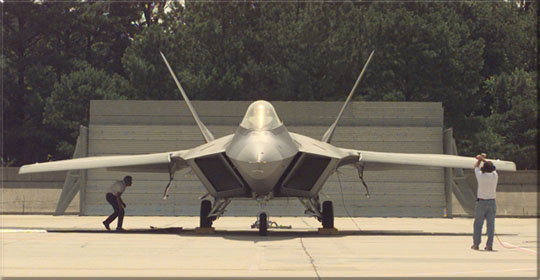 F-22 Virtavia Fsx/Fs9 Download